Our Apps
CodeSmart DNS Tester
CodeSmart DNS Tester
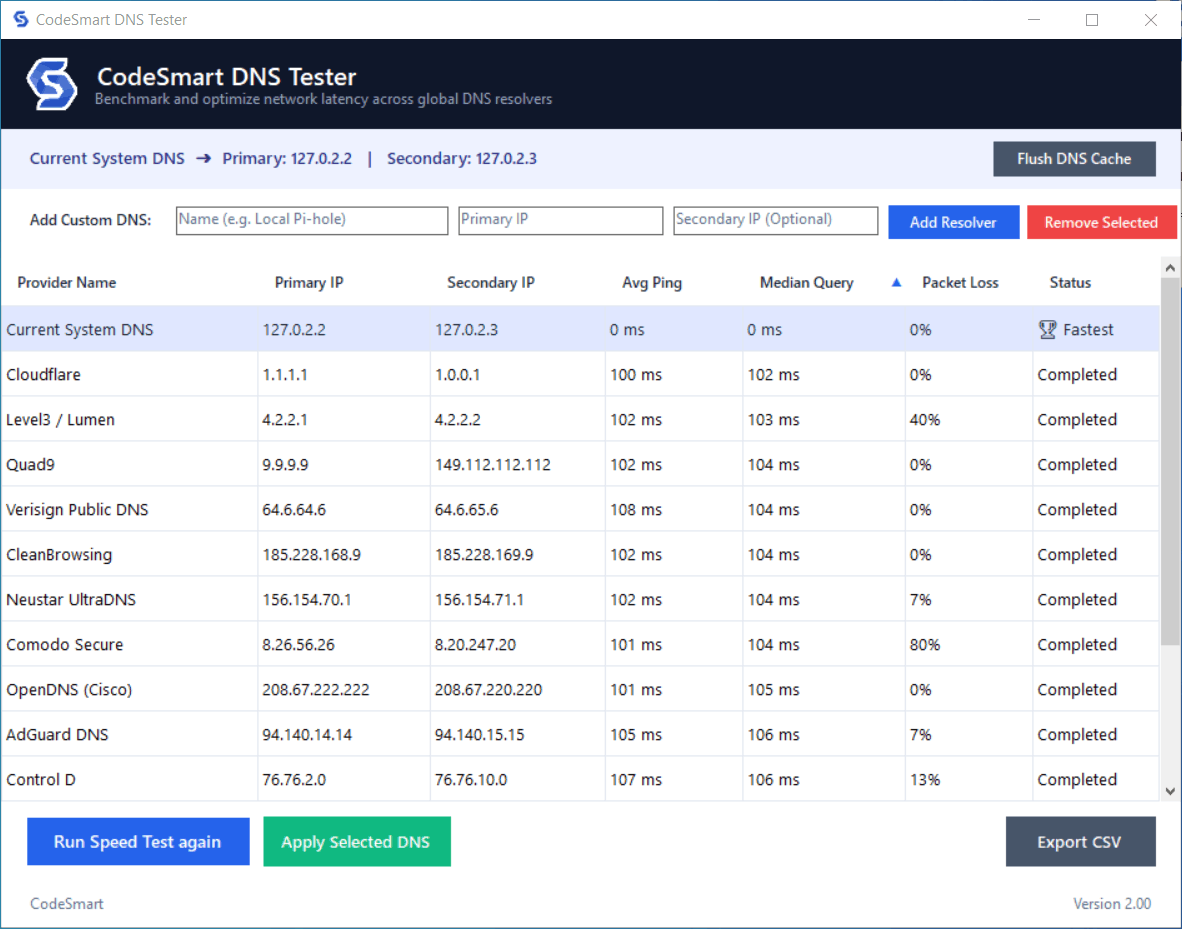
CodeSmartDNSTester (aka. CodeSmart DNS Tester) is a completely free, lightweight and portable Windows app, designed to speed-test popular and custom DNS resolvers, display current active DNS configurations, and automatically apply the fastest and most optimum server found to your network adapter in one click.
App Usage:
- Run the app, on a system with internet access
- The app will display your current DNS and the popular DNS resolvers in a table
- Click the "Start Speed Test" button to start the DNS speed test. Let the test complete
- The app will sort the DNS resolvers with respect to speed and let you know if you are using the fastest DNS or not
- You can also select any DNS row and click "Apply Selected DNS". This will setup your system to use the selected DNS resolver
- You can also add any DNS resolvers to the list
- You can export the DNS speed results in a csv file by clicking the "Export Results to CSV" button
Compatibility:
- Windows 11 (64 bit and ARM64)
- Windows 10 (32 and 64 bit)
- Windows 8 / Windows 7 (Fully functional provided the .NET Framework 4.8 runtime is installed on the system).
System & Framework Requirements:
- Runtime: Requires .NET Framework 4.8 (pre-installed natively on modern Windows 10/11 updates).
- Permissions: Requires Administrator privileges in order to change the current system DNS.
This application is completely safe and malware-free. Any AV detection results are false positives.
Virustotal scan result: https://www.virustotal.com/gui/file/5c2bdf5a412074e42f56ac53e6641dabb0bb050b37e9cc271c37b160d1dfa794?nocache=1
(Note: Windows SmartScreen may display a standard 'Windows protected your PC' warning upon launching. If this occurs, simply click More info and then Run anyway to proceed.)
CodeSmart Archive Extractor
CodeSmart Archive Extractor
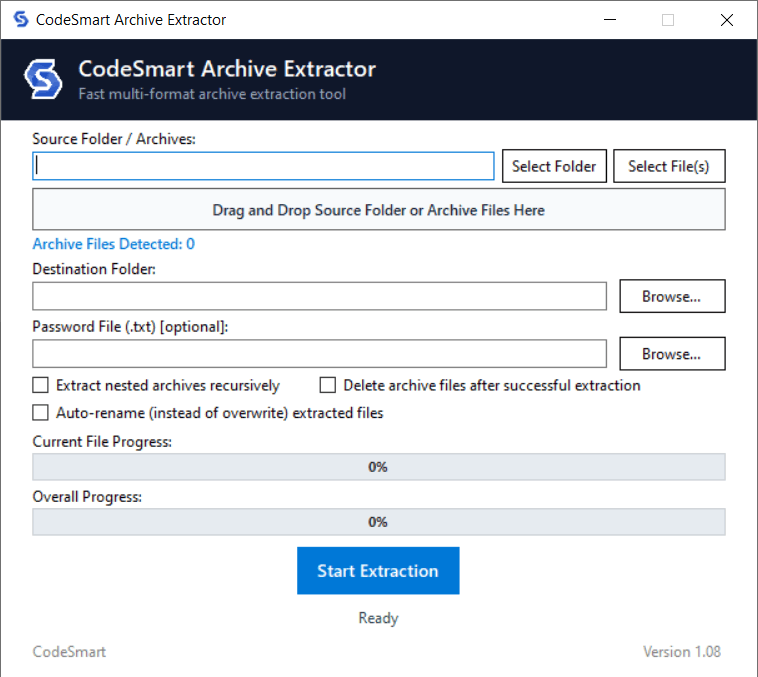
CodeSmartArchiveExtractor (aka. CodeSmart Archive Extractor) is a completely free, lightweight and portable Windows app, designed to handle multi-format archive extractions (in batch, if needed), scan source directories, process password lists, and automatically manage archive workflows with nested extraction and auto-rename capabilities.
App Usage:
- Select or drag-and-drop a source folder or archive files into the application.
- Specify your destination folder path for the extracted contents.
- Optionally provide a text file containing passwords and configure checkboxes for nested extraction, deletion after extraction, or auto-renaming.
- Click the "Start Extraction" button to begin processing the archives.
- View overall and individual file progress in real time, and inspect the session results log upon completion.
Supported File Types and Formats:
- RAR (.rar)
- ZIP (.zip)
- 7-Zip (.7z)
- TAR (.tar)
- GZIP (.gz)
- XZ (.xz)
- BZIP2 (.bz2)
- TAR+GZIP (.tar.gz, .tgz)
- TAR+XZ (.tar.xz, .txz)
- TAR+BZIP2 (.tar.bz2, .tbz2, .tbz)
Multi-part archive support:
- RAR multi-part: archive.rar + .r00, .r01, .r02...
- RAR multi-part: archive.part1.rar, .part2.rar, ...
- ZIP multi-part: .zip.001, .z01+.zip, ...
- 7-ZIP multi-part: .7z.001, .002...
- GZIP multi-part: .gz, .gz.2, .gz.3...
- Generic multi-part: archive.ext.001, .002, .003...
Supports password protected archives
Compatibility:
- Windows 11 (64 bit and ARM64)
- Windows 10 (32 and 64 bit)
- Windows 8 / Windows 7 (Fully functional provided the .NET Framework 4.8 runtime is installed on the system).
System & Framework Requirements:
- Runtime: Requires .NET Framework 4.8 (pre-installed natively on modern Windows 10/11 updates).
This application is completely safe and malware-free. Any AV detection results are false positives.
Virustotal scan result: https://www.virustotal.com/gui/file/6e57b636a116c1d71baebdd86995695dfba6aaf4715751f1774a36957639f575?nocache=1
(Note: Windows SmartScreen may display a standard 'Windows protected your PC' warning upon launching. If this occurs, simply click More info and then Run anyway to proceed.)